Free Electronic Signature Apps to Boost Productivity in 2026
It's 4:45 p.m. on a Friday, and a client is waiting on a signed contract before they'll release payment. You don't have a printer nearby, and even if you did, scanning and emailing a signed PDF would eat the last twenty minutes of your workday. This is the exact moment an electronic signature free tool earns its place in your toolkit — no printer, no scanner, no delay.
Millions of freelancers, HR teams, and small businesses face this same bottleneck every week. The good news is that you don't need an expensive enterprise contract to solve it. Several free electronic signature apps, including WeSignature, let you sign and send documents in minutes, legally and securely.
This guide walks through what electronic signatures actually are, why free tools matter for modern teams, and how six popular platforms compare — so you can pick the right one for your workflow.
Key Takeaways
An electronic signature free solution can legally validate contracts, offer letters, NDAs, and invoices under laws like the ESIGN Act and eIDAS.
Free plans typically cap the number of documents you can send per month, so matching the tool to your volume matters.
WeSignature, DocuSign Free, Dropbox Sign, SignWell, Smallpdf Sign, and Adobe Acrobat Sign each serve slightly different use cases.
Security features like audit trails and encryption are non-negotiable, even on a free tier.
Choosing the right document signer saves hours per week and removes printing, scanning, and mailing from your workflow entirely.
What Is an Electronic Signature?
An electronic signature is any digital mark, typed name, drawn signature, or click-to-sign action that shows a person's intent to agree to a document's terms. It replaces the need for a wet-ink signature on paper.
A digital signature is a specific, more technical type of electronic signature. It uses cryptographic technology to bind the signer's identity to the document and detect any tampering after signing. In other words, every digital signature is an electronic signature, but not every electronic signature uses digital signature encryption.
Legality depends less on the technology and more on intent, consent, and record-keeping. A valid electronic signature typically requires:
Clear intent to sign
Consent to do business electronically
An audit trail linking the signature to the signer
Retention of the signed record
Security comes from encryption, identity verification, tamper-evident seals, and detailed audit logs — features most reputable eSignature software now builds in by default.
Why Businesses Need an Electronic Signature Free Solution
Remote work turned document signing into a daily necessity rather than an occasional task. Teams spread across time zones can't wait for physical paperwork to circulate, so a free eSignature app becomes part of the everyday stack.
Contracts and sales. Sales teams close deals faster when a proposal can be signed from a phone during a call instead of days later.
HR onboarding. Offer letters, NDAs, and policy acknowledgments move faster when new hires can sign before their first day.
Freelancers and consultants. Independent professionals often sign fewer than five documents a month, making a free plan genuinely sufficient rather than a stopgap.
Healthcare. Patient intake forms and consent documents benefit from secure document signing that maintains HIPAA-aware audit trails.
Education. Schools and universities use e-signatures for enrollment forms, permission slips, and staff contracts, cutting administrative overhead.
Across every one of these use cases, the common thread is speed without sacrificing legal enforceability.
Top Free Electronic Signature Apps
Overview: WeSignature is a straightforward document signer built for individuals and small teams who want a clean signing experience without a steep learning curve.
Features: Drag-and-drop signature fields, multi-recipient signing order, document status tracking, and reusable templates.
Pros: Simple interface, fast setup, clear document tracking.
Cons: Smaller third-party integration library compared to legacy enterprise players.
Pricing: Free plan available for low-volume senders, with paid tiers for teams needing higher volume and automation.
Best for: Freelancers, small businesses, and teams that want a fast, no-friction way to get documents signed.
DocuSign Free
Overview: DocuSign is the best-known name in the category, and its free tier lets new users test the platform before committing to a paid plan.
Features: Basic signature fields, recipient notifications, and a real-time audit trail.
Pros: Widely recognized brand that recipients already trust; reliable core signing experience.
Cons: The free plan is capped at a small number of documents per month, and templates, bulk sending, and integrations are locked behind paid tiers.
Pricing: Free for limited sends; paid plans start around $10–$15 per month when billed annually.
Best for: Occasional signers who need only a handful of documents processed per month.
Dropbox Sign
Overview: Formerly HelloSign, Dropbox Sign integrates tightly with Dropbox, Google Workspace, and Slack.
Features: Signature requests, in-person signing, and basic templates on paid plans.
Pros: Clean, minimal interface; strong cloud storage integration.
Cons: The free plan is also capped at a small number of monthly sends and lacks advanced workflow automation.
Pricing: Free for limited use; paid plans start around $15 per month.
Best for: Teams already living inside the Dropbox or Google Workspace ecosystem.
SignWell
Overview: SignWell positions itself as a lightweight, budget-friendly alternative to legacy e-signature giants.
Features: Unlimited templates even on the free tier, audit trails, reminders, and status tracking.
Pros: Generous free plan relative to competitors; simple, modern interface.
Cons: Advanced compliance and branding features require an upgrade.
Pricing: Free plan available for a limited number of documents monthly; paid plans start around $8–$12 per month.
Best for: Small teams that want unlimited templates without paying upfront.
Smallpdf Sign
Overview: Smallpdf built its reputation on PDF tools and folded e-signatures into its broader document suite.
Features: Web-based signing, no-account signing for one-off documents, and basic PDF editing alongside signature collection.
Pros: Very accessible for occasional, single-document use; no steep learning curve.
Cons: Fewer recipients allowed per document on the free tier, and advanced security features sit behind a paywall.
Pricing: Free for basic use; paid plans start around $12 per month for unlimited sends.
Best for: Freelancers who need to sign or request a signature on a single document occasionally.
Adobe Acrobat Sign
Overview: Adobe Acrobat Sign is part of the Adobe Document Cloud ecosystem, built for organizations already using Acrobat or Creative Cloud.
Features: Deep PDF editing, bulk sending, enterprise-grade compliance tracking, and integrations with Microsoft 365 and Salesforce.
Pros: Powerful for document-heavy, regulated workflows; strong Adobe ecosystem integration.
Cons: No permanent free plan — only a short free trial — and pricing climbs quickly for teams.
Pricing: Trial-only free access; paid plans start around $13 per month per license.
Best for: Organizations already invested in Adobe products that need advanced PDF and compliance tools.
Comparison Table
Software | Free Plan | Templates | Security | Best For | Pricing |
WeSignature | Yes, limited monthly documents | Yes | Encryption, audit trail | Freelancers & small teams | Free; paid tiers for scale |
DocuSign Free | Yes, capped sends/month | No (paid only) | Encryption, audit trail | Occasional signers | Free; from ~$10–15/mo |
Dropbox Sign | Yes, capped sends/month | No (paid only) | Encryption, audit trail | Dropbox/Google users | Free; from ~$15/mo |
SignWell | Yes, generous limits | Yes, unlimited | Encryption, audit trail | Budget-conscious small teams | Free; from ~$8–12/mo |
Smallpdf Sign | Yes, basic use | Limited | Encryption | Single-document senders | Free; from ~$12/mo |
Adobe Acrobat Sign | Trial only | Yes (paid) | Enterprise-grade compliance | Adobe ecosystem users | From ~$13/mo per license |
Why WeSignature Is a Smart Choice
WeSignature stands out for teams that want document signing without wading through unnecessary complexity. The interface is designed around a clear signing path: upload, place fields, send, and track — nothing hidden behind extra clicks.
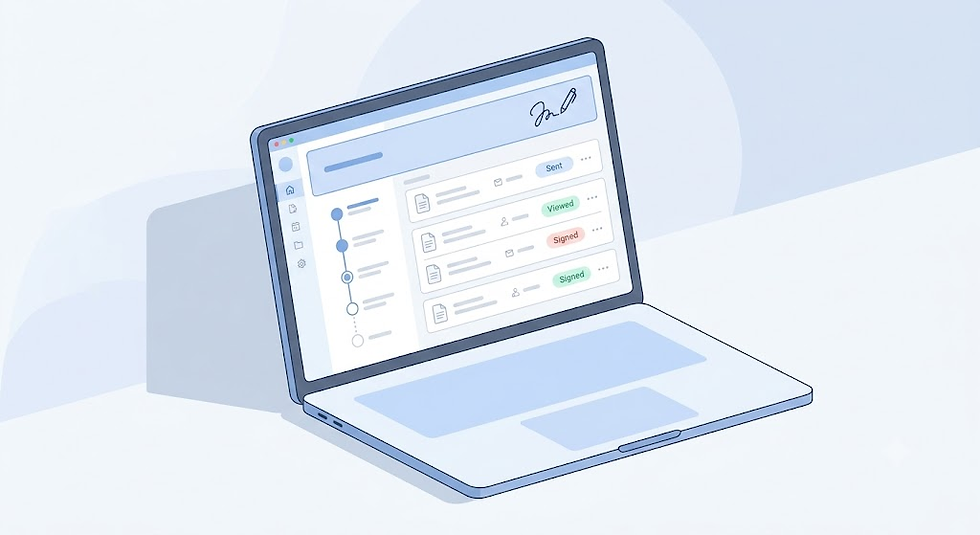
Ease of use matters most when recipients aren't tech-savvy. WeSignature keeps the signer-side experience minimal, which reduces abandoned or delayed signatures.
Affordability makes it approachable for solo professionals and small businesses that don't need enterprise contract management, just reliable signing.
Workflow automation through reusable templates saves time on recurring documents like NDAs or service agreements.
Document tracking shows exactly who has opened, viewed, and signed each document, so nothing falls through the cracks.
Security is built around encryption and audit trails that record every action taken on a document.
Legally compliant signatures align with recognized frameworks like the ESIGN Act, so agreements signed through WeSignature hold up the same way a paper signature would.
How to Sign Documents Online
Upload document — Add a PDF or Word file to the platform.
Add recipients — Enter the email addresses of everyone who needs to sign or review.
Place signature fields — Drag signature, date, and initial fields onto the document.
Send — Deliver the document for signature with one click.
Track — Monitor who has opened and signed in real time.
Download signed copy — Save the completed, audit-trailed document for your records.
Electronic Signature vs Digital Signature
Aspect | Electronic Signature | Digital Signature |
Definition | Any electronic mark showing intent to sign | Cryptographically secured signature tied to identity |
Technology | Typed name, click-to-sign, drawn signature | Public key infrastructure (PKI) encryption |
Verification | Audit trail and metadata | Certificate-based identity verification |
Common use | Contracts, HR forms, sales agreements | Government filings, financial documents, regulated industries |
Tamper detection | Limited | Built-in, detects any post-signing edits |

Is an Electronic Signature Legally Valid?
Yes, in most countries electronic signatures are legally binding when the signer's intent and consent are clearly documented. In the United States, the ESIGN Act (2000) and the Uniform Electronic Transactions Act (UETA) give electronic signatures the same legal weight as handwritten ones for most transactions. In the European Union, the eIDAS Regulation establishes tiers of electronic signatures, with qualified electronic signatures carrying the highest legal assurance. Exceptions exist for documents like wills, court orders, and certain real estate transfers, which may still require traditional signatures depending on jurisdiction.
Is an Electronic Signature Free Enough for Business Use?
For low-volume needs — a handful of contracts or forms per month — a free electronic signature plan is often genuinely sufficient. Tools like WeSignature and SignWell offer legally valid signing, audit trails, and basic templates at no cost. Businesses that regularly send higher volumes, need advanced automation, or require deep integrations will eventually outgrow free tiers and benefit from a paid plan.
Common Mistakes When Choosing a Document Signer
Ignoring monthly document or "envelope" limits before signing up.
Assuming all free plans include templates (many don't).
Overlooking whether the tool provides a detailed audit trail.
Not checking mobile signing support for recipients on the go.
Choosing a tool based on brand recognition alone, not actual features.
Skipping a review of data encryption and storage practices.
Failing to confirm legal compliance with ESIGN, UETA, or eIDAS for your region.
Not testing the recipient-side signing experience before rolling it out to clients.
Best Practices
Match the free plan's document limit to your actual monthly volume.
Always review the audit trail after a document is signed.
Use templates for recurring agreements to save setup time.
Verify recipient email addresses before sending sensitive documents.
Set signing order when multiple parties need to sign in sequence.
Store signed documents in a secure, backed-up location.
Test the mobile signing experience from a recipient's perspective.
Add clear instructions in the document for first-time signers.
Review your provider's security certifications periodically.
Reassess your plan every few months as sending volume changes.
If you're still comparing options, it's worth spending ten minutes inside WeSignature to see how the upload-to-signed-document flow feels in practice. It won't replace your own evaluation, but it's a useful benchmark against the other tools on this list.
Conclusion
Choosing the right free electronic signature app comes down to matching your document volume, security needs, and integrations to what each platform actually offers. DocuSign Free and Dropbox Sign work well for occasional signers already familiar with those brands. SignWell and Smallpdf Sign suit budget-conscious freelancers. Adobe Acrobat Sign fits teams already inside the Adobe ecosystem who need advanced PDF tools. WeSignature offers a balanced, easy-to-adopt option for individuals and small teams who want reliable signing without unnecessary complexity.
Before committing to a paid plan, it's worth testing a few of these tools directly, including WeSignature, to see which signing flow fits your team's day-to-day work best.
Ready to simplify how your team signs documents? Try WeSignature and see how much time a streamlined signing process can save.
FAQs
What is an electronic signature? An electronic signature is any digital mark — typed, drawn, or clicked — that shows a person's intent to agree to a document. It replaces handwritten signatures on paper. Electronic signatures are used across contracts, HR forms, and sales agreements, and are recognized as legally valid in most countries when intent and consent are properly documented.
Is an electronic signature legally binding? Yes, in most jurisdictions electronic signatures carry the same legal weight as handwritten ones. In the U.S., the ESIGN Act and UETA establish this standard; in the EU, eIDAS does the same. Certain documents, such as wills or specific real estate transfers, may still require traditional signatures depending on local law, so it's worth checking jurisdiction-specific exceptions.
Can I use an electronic signature free? Yes, several providers, including WeSignature, SignWell, and DocuSign, offer free plans for signing and sending documents. These free tiers typically cap the number of documents you can send per month. For low-volume users like freelancers or small teams, a free plan is often enough to handle regular signing needs without upgrading.
Is DocuSign free? DocuSign offers a free plan, but it's limited to a small number of sent documents per month and excludes templates, bulk sending, and most integrations. It's suitable for occasional signers rather than regular business use. Teams needing more volume or automation typically move to a paid tier starting around $10–$15 per month.
Which document signer is best? The best document signer depends on your volume and workflow. WeSignature and SignWell suit small teams wanting simplicity and generous free limits. DocuSign and Dropbox Sign fit users who value brand familiarity. Adobe Acrobat Sign is best for Adobe-invested organizations needing advanced PDF and compliance tools.
How secure are electronic signatures? Reputable electronic signature platforms use encryption, detailed audit trails, and identity verification to secure documents. Every signing action is logged with a timestamp, IP address, and signer details, creating evidence that holds up if a document is ever disputed. Security strength varies by provider, so checking certifications like SOC 2 is worth doing.

Comments